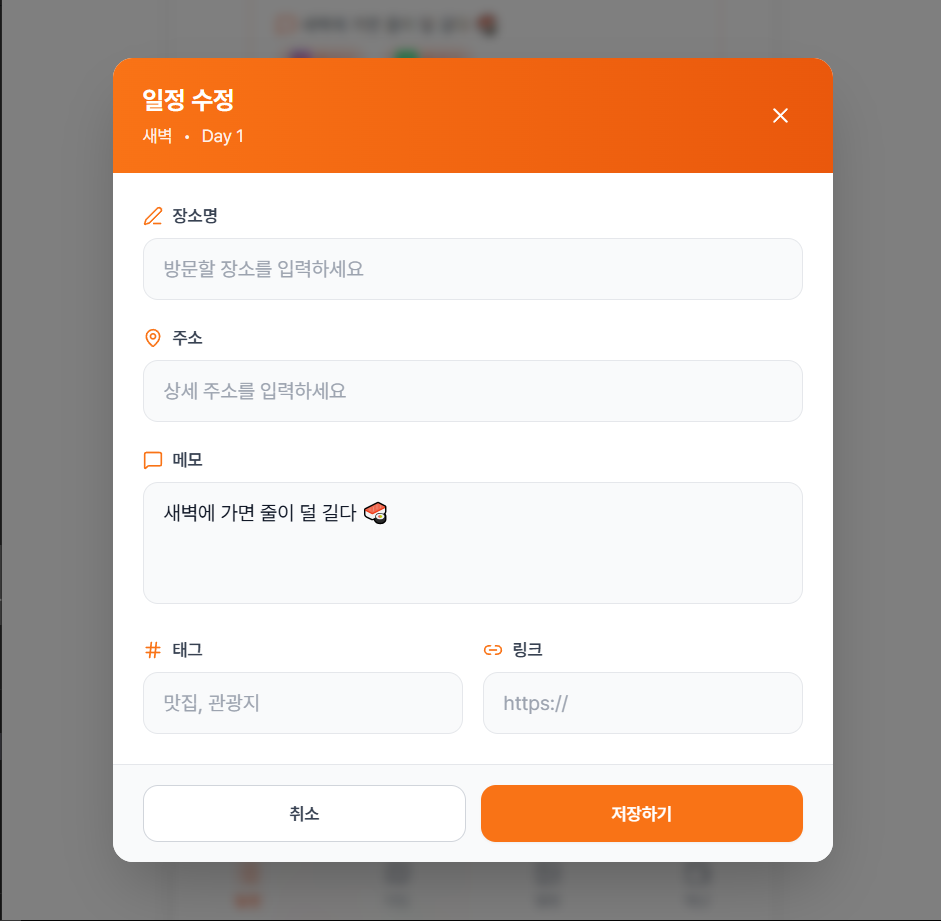
1. 기본
코드
더보기
// ScheduleItemModal.tsx
// 변경 사항: handleSubmit에서 placeData까지 부모로 전달
import { useState, useEffect } from "react";
import { X, MapPin, MessageSquare, Hash, Link2, Edit3 } from "lucide-react";
import type { ScheduleResponseDto } from "../types/schedule";
import type { PlaceResponseDto } from "@/features/place/types/place";
interface Props {
open: boolean;
onClose: () => void;
onSave: (item: ScheduleResponseDto, placeData?: PlaceResponseDto) => void;
Schedule?: ScheduleResponseDto | null;
place?: PlaceResponseDto | null;
slot: ScheduleResponseDto["timeSlot"];
selectedDay: number;
}
export default function ScheduleItemModal({ open, onClose, onSave, Schedule, place, slot, selectedDay }: Props) {
const [placeName, setPlaceName] = useState("");
const [address, setAddress] = useState("");
const [memo, setMemo] = useState("");
const [hash, setHash] = useState("");
const [link, setLink] = useState("");
useEffect(() => {
setMemo(Schedule?.memo ?? "");
setPlaceName(place?.name ?? "");
setAddress(place?.address ?? "");
setHash(place?.hash ?? "");
setLink(place?.links?.[0] ?? "");
}, [Schedule, place, open]);
if (!open) return null;
const handleSubmit = () => {
const newSchedule: ScheduleResponseDto = {
id: Schedule?.id ?? Date.now(),
day: selectedDay,
timeSlot: slot,
isCompleted: Schedule?.isCompleted ?? false,
sequence: Schedule?.sequence ?? 1,
memo,
};
const newPlace: PlaceResponseDto = {
id: place?.id ?? Date.now(),
name: placeName,
address,
hash,
links: link ? [link] : [],
};
onSave(newSchedule, newPlace);
onClose();
};
return (
<div className="fixed inset-0 z-50 flex items-center justify-center bg-black/40 backdrop-blur-sm transition-all">
<div className="bg-white rounded-2xl shadow-2xl w-[90%] max-w-md overflow-hidden animate-fadeIn">
<div className="bg-[var(--color-primary)] text-white py-4 px-6 flex justify-between items-center">
<h2 className="text-lg font-semibold tracking-tight">
{Schedule ? "일정 수정" : "일정 추가"} — <span className="opacity-90">{slot}</span>
</h2>
<button onClick={onClose} className="text-white/80 hover:text-white transition">
<X className="w-5 h-5" />
</button>
</div>
<div className="p-6 space-y-4">
<div className="flex items-center gap-2 border-b pb-2">
<Edit3 className="w-4 h-4 text-[var(--color-primary)]" />
<input value={placeName} onChange={(e) => setPlaceName(e.target.value)} placeholder="장소명을 입력하세요" className="flex-1 text-sm text-gray-700 placeholder-gray-400 focus:outline-none" />
</div>
<div className="flex items-center gap-2 border-b pb-2">
<MapPin className="w-4 h-4 text-[var(--color-primary)]" />
<input value={address} onChange={(e) => setAddress(e.target.value)} placeholder="주소를 입력하세요" className="flex-1 text-sm text-gray-700 placeholder-gray-400 focus:outline-none" />
</div>
<div className="flex items-start gap-2 border-b pb-2">
<MessageSquare className="w-4 h-4 mt-1 text-[var(--color-primary)]" />
<textarea value={memo} onChange={(e) => setMemo(e.target.value)} placeholder="메모를 입력하세요" rows={2} className="flex-1 text-sm text-gray-700 placeholder-gray-400 resize-none focus:outline-none" />
</div>
<div className="flex items-center gap-2 border-b pb-2">
<Hash className="w-4 h-4 text-[var(--color-primary)]" />
<input value={hash} onChange={(e) => setHash(e.target.value)} placeholder="#해시태그 (쉼표로 구분)" className="flex-1 text-sm text-gray-700 placeholder-gray-400 focus:outline-none" />
</div>
<div className="flex items-center gap-2 border-b pb-2">
<Link2 className="w-4 h-4 text-[var(--color-primary)]" />
<input value={link} onChange={(e) => setLink(e.target.value)} placeholder="후기 링크 (선택)" className="flex-1 text-sm text-gray-700 placeholder-gray-400 focus:outline-none" />
</div>
</div>
<div className="bg-gray-50 border-t py-4 px-6 flex justify-end">
<button onClick={handleSubmit} className="bg-[var(--color-primary)] hover:bg-[var(--color-primary-dark)] text-white px-5 py-2.5 rounded-full text-sm font-medium shadow-sm transition-all">
저장
</button>
</div>
</div>
</div>
);
}
사진
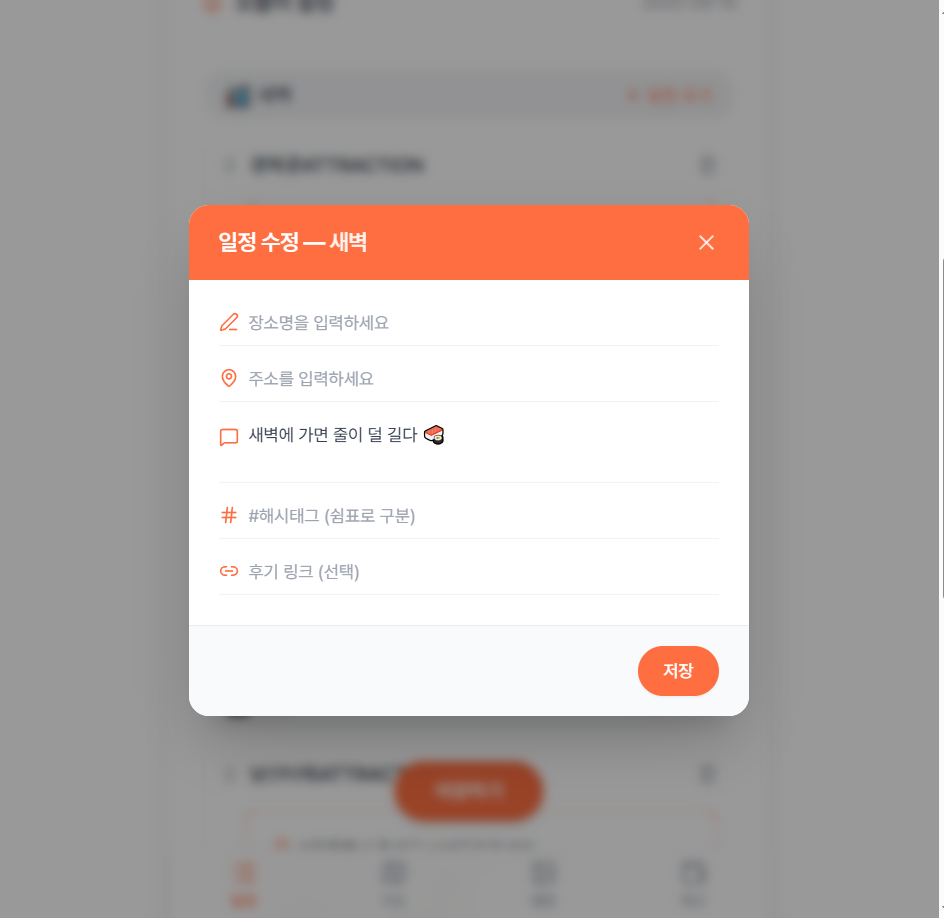
2.
코드
더보기
// ScheduleItemModal.tsx
// 프로젝트 디자인 통일: 기존 컴포넌트 스타일과 일관성 유지
import { useState, useEffect } from "react";
import { X, MapPin, MessageSquare, Hash, Link2, Edit3 } from "lucide-react";
import { motion, AnimatePresence } from "framer-motion";
import type { ScheduleResponseDto } from "../types/schedule";
import type { PlaceResponseDto } from "@/features/place/types/place";
interface Props {
open: boolean;
onClose: () => void;
onSave: (item: ScheduleResponseDto, placeData?: PlaceResponseDto) => void;
Schedule?: ScheduleResponseDto | null;
place?: PlaceResponseDto | null;
slot: ScheduleResponseDto["timeSlot"];
selectedDay: number;
}
export default function ScheduleItemModal({
open,
onClose,
onSave,
Schedule,
place,
slot,
selectedDay
}: Props) {
const [placeName, setPlaceName] = useState("");
const [address, setAddress] = useState("");
const [memo, setMemo] = useState("");
const [hash, setHash] = useState("");
const [link, setLink] = useState("");
useEffect(() => {
if (open) {
setMemo(Schedule?.memo ?? "");
setPlaceName(place?.name ?? "");
setAddress(place?.address ?? "");
setHash(place?.hash ?? "");
setLink(place?.links?.[0] ?? "");
}
}, [Schedule, place, open]);
if (!open) return null;
const handleSubmit = () => {
const newSchedule: ScheduleResponseDto = {
id: Schedule?.id ?? Date.now(),
day: selectedDay,
timeSlot: slot,
isCompleted: Schedule?.isCompleted ?? false,
sequence: Schedule?.sequence ?? 1,
memo,
};
const newPlace: PlaceResponseDto = {
id: place?.id ?? Date.now(),
name: placeName,
address,
hash,
links: link ? [link] : [],
};
onSave(newSchedule, newPlace);
onClose();
};
const handleBackdropClick = (e: React.MouseEvent) => {
if (e.target === e.currentTarget) {
onClose();
}
};
return (
<AnimatePresence>
{open && (
<motion.div
initial={{ opacity: 0 }}
animate={{ opacity: 1 }}
exit={{ opacity: 0 }}
transition={{ duration: 0.2 }}
className="fixed inset-0 z-50 flex items-center justify-center bg-black/40 backdrop-blur-sm"
onClick={handleBackdropClick}
>
<motion.div
initial={{ scale: 0.95, opacity: 0 }}
animate={{ scale: 1, opacity: 1 }}
exit={{ scale: 0.95, opacity: 0 }}
transition={{ duration: 0.2 }}
className="bg-white rounded-2xl shadow-xl w-[90%] max-w-md overflow-hidden"
>
{/* Header */}
<div className="bg-[var(--color-primary)] text-white py-4 px-5 flex justify-between items-center">
<div>
<h2 className="text-lg font-semibold">
{Schedule ? "일정 수정" : "일정 추가"}
</h2>
<p className="text-sm text-white/80 mt-0.5">{slot}</p>
</div>
<button
onClick={onClose}
className="text-white/80 hover:text-white transition-colors p-1 rounded-lg hover:bg-white/10"
>
<X className="w-5 h-5" />
</button>
</div>
{/* Form Content */}
<div className="p-5 space-y-4 max-h-[70vh] overflow-y-auto">
{/* Place Name */}
<div>
<label className="text-xs font-medium text-gray-600 mb-2 flex items-center gap-1">
<Edit3 className="w-3.5 h-3.5 text-[var(--color-primary)]" />
장소명
</label>
<input
value={placeName}
onChange={(e) => setPlaceName(e.target.value)}
placeholder="방문할 장소를 입력하세요"
className="w-full border border-[var(--color-primary-border)] rounded-xl px-4 py-3 text-sm text-gray-800 placeholder-gray-400 focus:outline-none focus:border-[var(--color-primary)] transition-colors"
/>
</div>
{/* Address */}
<div>
<label className="text-xs font-medium text-gray-600 mb-2 flex items-center gap-1">
<MapPin className="w-3.5 h-3.5 text-[var(--color-primary)]" />
주소
</label>
<input
value={address}
onChange={(e) => setAddress(e.target.value)}
placeholder="상세 주소를 입력하세요"
className="w-full border border-[var(--color-primary-border)] rounded-xl px-4 py-3 text-sm text-gray-800 placeholder-gray-400 focus:outline-none focus:border-[var(--color-primary)] transition-colors"
/>
</div>
{/* Memo */}
<div>
<label className="text-xs font-medium text-gray-600 mb-2 flex items-center gap-1">
<MessageSquare className="w-3.5 h-3.5 text-[var(--color-primary)]" />
메모
</label>
<textarea
value={memo}
onChange={(e) => setMemo(e.target.value)}
placeholder="일정에 대한 메모를 작성하세요"
rows={3}
className="w-full border border-[var(--color-primary-border)] rounded-xl px-4 py-3 text-sm text-gray-800 placeholder-gray-400 resize-none focus:outline-none focus:border-[var(--color-primary)] transition-colors"
/>
</div>
{/* Hash Tags */}
<div>
<label className="text-xs font-medium text-gray-600 mb-2 flex items-center gap-1">
<Hash className="w-3.5 h-3.5 text-[var(--color-primary)]" />
해시태그
</label>
<input
value={hash}
onChange={(e) => setHash(e.target.value)}
placeholder="맛집, 관광지 (쉼표로 구분)"
className="w-full border border-[var(--color-primary-border)] rounded-xl px-4 py-3 text-sm text-gray-800 placeholder-gray-400 focus:outline-none focus:border-[var(--color-primary)] transition-colors"
/>
</div>
{/* Link */}
<div>
<label className="text-xs font-medium text-gray-600 mb-2 flex items-center gap-1">
<Link2 className="w-3.5 h-3.5 text-[var(--color-primary)]" />
참고 링크
</label>
<input
value={link}
onChange={(e) => setLink(e.target.value)}
className="w-full border border-[var(--color-primary-border)] rounded-xl px-4 py-3 text-sm text-gray-800 placeholder-gray-400 focus:outline-none focus:border-[var(--color-primary)] transition-colors"
/>
</div>
</div>
{/* Footer */}
<div className="bg-gray-50 border-t border-gray-200 py-4 px-5 flex gap-3">
<button
onClick={onClose}
className="flex-1 bg-white border border-gray-300 hover:bg-gray-50 text-gray-700 px-4 py-2.5 rounded-xl text-sm font-medium transition-all"
>
취소
</button>
<button
onClick={handleSubmit}
className="flex-1 bg-[var(--color-primary)] hover:bg-[var(--color-primary-dark)] text-white px-4 py-2.5 rounded-xl text-sm font-medium shadow-sm transition-all"
>
저장
</button>
</div>
</motion.div>
</motion.div>
)}
</AnimatePresence>
);
}
사진
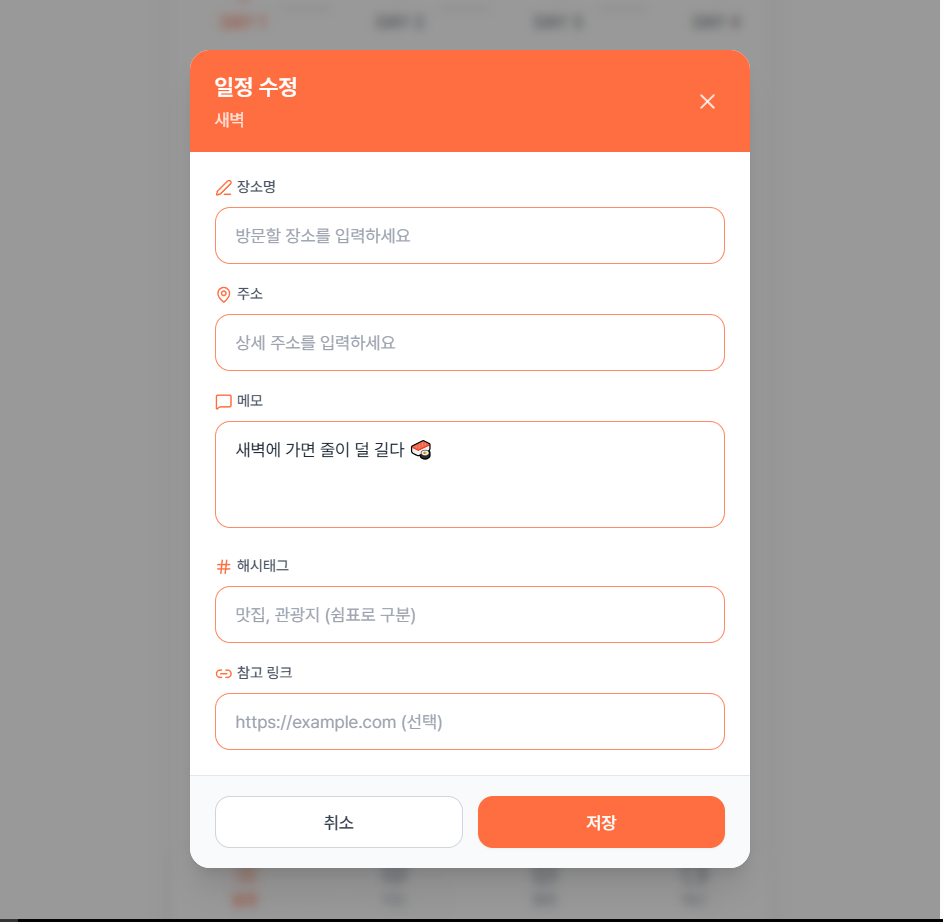
3.
코드
더보기
// ScheduleItemModal.tsx
// 프리미엄 디자인: 향상된 UX, 유효성 검사, 스마트 인터랙션
import { useState, useEffect } from "react";
import { X, MapPin, MessageSquare, Hash, Link2, Edit3, CheckCircle2, AlertCircle } from "lucide-react";
import { motion, AnimatePresence } from "framer-motion";
import type { ScheduleResponseDto } from "../types/schedule";
import type { PlaceResponseDto } from "@/features/place/types/place";
interface Props {
open: boolean;
onClose: () => void;
onSave: (item: ScheduleResponseDto, placeData?: PlaceResponseDto) => void;
Schedule?: ScheduleResponseDto | null;
place?: PlaceResponseDto | null;
slot: ScheduleResponseDto["timeSlot"];
selectedDay: number;
}
export default function ScheduleItemModal({
open,
onClose,
onSave,
Schedule,
place,
slot,
selectedDay
}: Props) {
const [placeName, setPlaceName] = useState("");
const [address, setAddress] = useState("");
const [memo, setMemo] = useState("");
const [hash, setHash] = useState("");
const [link, setLink] = useState("");
const [focusedField, setFocusedField] = useState<string | null>(null);
const [errors, setErrors] = useState<Record<string, string>>({});
useEffect(() => {
if (open) {
setMemo(Schedule?.memo ?? "");
setPlaceName(place?.name ?? "");
setAddress(place?.address ?? "");
setHash(place?.hash ?? "");
setLink(place?.links?.[0] ?? "");
setErrors({});
setFocusedField(null);
}
}, [Schedule, place, open]);
if (!open) return null;
const validateForm = () => {
const newErrors: Record<string, string> = {};
if (!placeName.trim()) {
newErrors.placeName = "장소명을 입력해주세요";
}
if (link && !link.match(/^https?:\/\/.+/)) {
newErrors.link = "올바른 URL 형식이 아닙니다";
}
setErrors(newErrors);
return Object.keys(newErrors).length === 0;
};
const handleSubmit = () => {
if (!validateForm()) return;
const newSchedule: ScheduleResponseDto = {
id: Schedule?.id ?? Date.now(),
day: selectedDay,
timeSlot: slot,
isCompleted: Schedule?.isCompleted ?? false,
sequence: Schedule?.sequence ?? 1,
memo,
};
const newPlace: PlaceResponseDto = {
id: place?.id ?? Date.now(),
name: placeName,
address,
hash,
links: link ? [link] : [],
};
onSave(newSchedule, newPlace);
onClose();
};
const handleBackdropClick = (e: React.MouseEvent) => {
if (e.target === e.currentTarget) {
onClose();
}
};
const inputVariants = {
focused: { scale: 1.01, transition: { duration: 0.2 } },
unfocused: { scale: 1, transition: { duration: 0.2 } }
};
return (
<AnimatePresence>
{open && (
<motion.div
initial={{ opacity: 0 }}
animate={{ opacity: 1 }}
exit={{ opacity: 0 }}
transition={{ duration: 0.25 }}
className="fixed inset-0 z-50 flex items-center justify-center bg-black/50 backdrop-blur-sm"
onClick={handleBackdropClick}
>
<motion.div
initial={{ scale: 0.9, opacity: 0, y: 20 }}
animate={{ scale: 1, opacity: 1, y: 0 }}
exit={{ scale: 0.9, opacity: 0, y: 20 }}
transition={{ duration: 0.25, ease: "easeOut" }}
className="bg-white rounded-2xl shadow-2xl w-[90%] max-w-lg overflow-hidden"
>
{/* Header */}
<div className="relative bg-gradient-to-br from-orange-500 via-orange-600 to-red-500 text-white py-6 px-6 overflow-hidden">
<div className="absolute inset-0 opacity-10 bg-[radial-gradient(circle_at_30%_50%,white,transparent)]"></div>
<div className="absolute -top-10 -right-10 w-40 h-40 bg-yellow-400/20 rounded-full blur-3xl"></div>
<div className="absolute -bottom-10 -left-10 w-40 h-40 bg-red-400/20 rounded-full blur-3xl"></div>
<div className="relative flex justify-between items-start">
<div className="flex-1">
<motion.h2
initial={{ x: -20, opacity: 0 }}
animate={{ x: 0, opacity: 1 }}
transition={{ delay: 0.1 }}
className="text-xl font-bold mb-1"
>
{Schedule ? "일정 수정" : "새로운 일정"}
</motion.h2>
<motion.div
initial={{ x: -20, opacity: 0 }}
animate={{ x: 0, opacity: 1 }}
transition={{ delay: 0.15 }}
className="flex items-center gap-2 text-sm text-white/90"
>
<span className="bg-gradient-to-r from-yellow-400/30 to-orange-300/30 backdrop-blur-sm px-3 py-1 rounded-full font-medium border border-white/20">
{slot}
</span>
<span className="text-white/60">•</span>
<span>Day {selectedDay}</span>
</motion.div>
</div>
<motion.button
whileHover={{ scale: 1.1, rotate: 90 }}
whileTap={{ scale: 0.9 }}
onClick={onClose}
className="text-white/80 hover:text-white hover:bg-white/20 p-2 rounded-lg transition-colors"
>
<X className="w-5 h-5" />
</motion.button>
</div>
</div>
{/* Form Content */}
<div className="p-6 space-y-4 max-h-[65vh] overflow-y-auto">
{/* Place Name - Required */}
<motion.div
variants={inputVariants}
animate={focusedField === "placeName" ? "focused" : "unfocused"}
>
<label className="text-xs font-semibold text-gray-600 mb-2 flex items-center gap-1.5">
<Edit3 className="w-3.5 h-3.5 text-[var(--color-primary)]" />
장소명
<span className="text-red-500 ml-0.5">*</span>
</label>
<div className="relative">
<input
value={placeName}
onChange={(e) => {
setPlaceName(e.target.value);
if (errors.placeName) setErrors(prev => ({ ...prev, placeName: "" }));
}}
onFocus={() => setFocusedField("placeName")}
onBlur={() => setFocusedField(null)}
placeholder="방문할 장소를 입력하세요"
className={`w-full border-2 rounded-xl px-4 py-3 text-sm text-gray-800 placeholder-gray-400 focus:outline-none transition-all ${
errors.placeName
? "border-red-300 focus:border-red-500"
: "border-gray-200 focus:border-[var(--color-primary)] focus:shadow-lg focus:shadow-[var(--color-primary)]/10"
}`}
/>
{placeName && !errors.placeName && (
<motion.div
initial={{ scale: 0 }}
animate={{ scale: 1 }}
className="absolute right-3 top-1/2 -translate-y-1/2"
>
<CheckCircle2 className="w-5 h-5 text-green-500" />
</motion.div>
)}
</div>
<AnimatePresence>
{errors.placeName && (
<motion.p
initial={{ opacity: 0, y: -10 }}
animate={{ opacity: 1, y: 0 }}
exit={{ opacity: 0, y: -10 }}
className="text-xs text-red-500 mt-1.5 flex items-center gap-1"
>
<AlertCircle className="w-3 h-3" />
{errors.placeName}
</motion.p>
)}
</AnimatePresence>
</motion.div>
{/* Address */}
<motion.div
variants={inputVariants}
animate={focusedField === "address" ? "focused" : "unfocused"}
>
<label className="text-xs font-semibold text-gray-600 mb-2 flex items-center gap-1.5">
<MapPin className="w-3.5 h-3.5 text-[var(--color-primary)]" />
주소
</label>
<input
value={address}
onChange={(e) => setAddress(e.target.value)}
onFocus={() => setFocusedField("address")}
onBlur={() => setFocusedField(null)}
placeholder="상세 주소를 입력하세요"
className="w-full border-2 border-gray-200 rounded-xl px-4 py-3 text-sm text-gray-800 placeholder-gray-400 focus:outline-none focus:border-[var(--color-primary)] focus:shadow-lg focus:shadow-[var(--color-primary)]/10 transition-all"
/>
</motion.div>
{/* Memo */}
<motion.div
variants={inputVariants}
animate={focusedField === "memo" ? "focused" : "unfocused"}
>
<label className="text-xs font-semibold text-gray-600 mb-2 flex items-center gap-1.5">
<MessageSquare className="w-3.5 h-3.5 text-[var(--color-primary)]" />
메모
</label>
<div className="relative">
<textarea
value={memo}
onChange={(e) => setMemo(e.target.value)}
onFocus={() => setFocusedField("memo")}
onBlur={() => setFocusedField(null)}
placeholder="일정에 대한 메모를 작성하세요 (준비물, 주의사항 등)"
rows={3}
className="w-full border-2 border-gray-200 rounded-xl px-4 py-3 text-sm text-gray-800 placeholder-gray-400 resize-none focus:outline-none focus:border-[var(--color-primary)] focus:shadow-lg focus:shadow-[var(--color-primary)]/10 transition-all"
/>
{memo && (
<span className="absolute bottom-2 right-3 text-xs text-gray-400">
{memo.length}자
</span>
)}
</div>
</motion.div>
<div className="grid grid-cols-1 md:grid-cols-2 gap-4">
{/* Hash Tags */}
<motion.div
variants={inputVariants}
animate={focusedField === "hash" ? "focused" : "unfocused"}
>
<label className="text-xs font-semibold text-gray-600 mb-2 flex items-center gap-1.5">
<Hash className="w-3.5 h-3.5 text-[var(--color-primary)]" />
태그
</label>
<input
value={hash}
onChange={(e) => setHash(e.target.value)}
onFocus={() => setFocusedField("hash")}
onBlur={() => setFocusedField(null)}
placeholder="맛집, 관광지"
className="w-full border-2 border-gray-200 rounded-xl px-4 py-3 text-sm text-gray-800 placeholder-gray-400 focus:outline-none focus:border-[var(--color-primary)] focus:shadow-lg focus:shadow-[var(--color-primary)]/10 transition-all"
/>
</motion.div>
{/* Link */}
<motion.div
variants={inputVariants}
animate={focusedField === "link" ? "focused" : "unfocused"}
>
<label className="text-xs font-semibold text-gray-600 mb-2 flex items-center gap-1.5">
<Link2 className="w-3.5 h-3.5 text-[var(--color-primary)]" />
링크
</label>
<input
value={link}
onChange={(e) => {
setLink(e.target.value);
if (errors.link) setErrors(prev => ({ ...prev, link: "" }));
}}
onFocus={() => setFocusedField("link")}
onBlur={() => setFocusedField(null)}
placeholder="https://"
className={`w-full border-2 rounded-xl px-4 py-3 text-sm text-gray-800 placeholder-gray-400 focus:outline-none transition-all ${
errors.link
? "border-red-300 focus:border-red-500"
: "border-gray-200 focus:border-[var(--color-primary)] focus:shadow-lg focus:shadow-[var(--color-primary)]/10"
}`}
/>
<AnimatePresence>
{errors.link && (
<motion.p
initial={{ opacity: 0, y: -10 }}
animate={{ opacity: 1, y: 0 }}
exit={{ opacity: 0, y: -10 }}
className="text-xs text-red-500 mt-1.5 flex items-center gap-1"
>
<AlertCircle className="w-3 h-3" />
{errors.link}
</motion.p>
)}
</AnimatePresence>
</motion.div>
</div>
</div>
{/* Footer */}
<div className="bg-gradient-to-t from-gray-50 to-white border-t border-gray-200 py-4 px-6 flex gap-3">
<motion.button
whileHover={{ scale: 1.02 }}
whileTap={{ scale: 0.98 }}
onClick={onClose}
className="flex-1 bg-white border-2 border-gray-300 hover:bg-gray-50 hover:border-gray-400 text-gray-700 px-5 py-3 rounded-xl text-sm font-semibold transition-all shadow-sm"
>
취소
</motion.button>
<motion.button
whileHover={{ scale: 1.02 }}
whileTap={{ scale: 0.98 }}
onClick={handleSubmit}
className="flex-1 bg-gradient-to-br from-orange-500 via-orange-600 to-red-500 hover:shadow-lg hover:shadow-[var(--color-primary)]/30 text-white px-5 py-3 rounded-xl text-sm font-semibold transition-all shadow-md flex items-center justify-center gap-2"
>
저장하기
</motion.button>
</div>
</motion.div>
</motion.div>
)}
</AnimatePresence>
);
}
사진
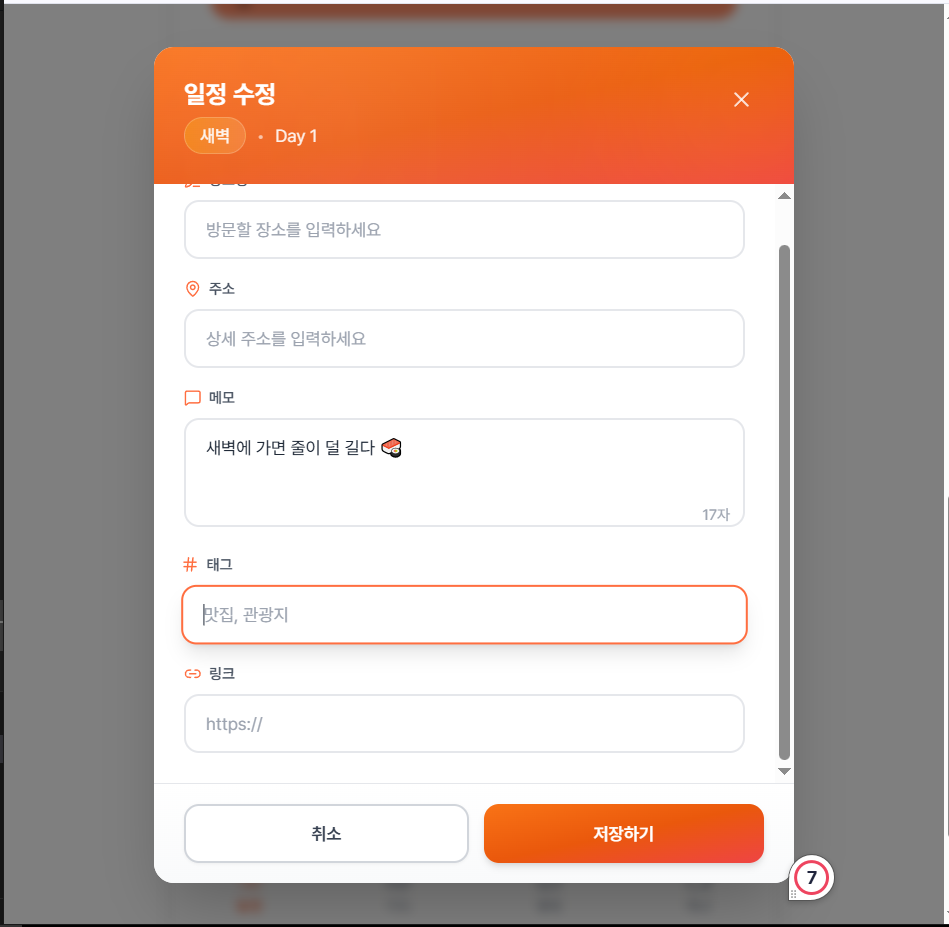
4번
코드
더보기
// ScheduleItemModal.tsx
// 프리미엄 디자인: 향상된 UX, 유효성 검사, 스마트 인터랙션
import { useState, useEffect } from "react";
import { X, MapPin, MessageSquare, Hash, Link2, Edit3, CheckCircle2, AlertCircle } from "lucide-react";
import { motion, AnimatePresence } from "framer-motion";
import type { ScheduleResponseDto } from "../types/schedule";
import type { PlaceResponseDto } from "@/features/place/types/place";
interface Props {
open: boolean;
onClose: () => void;
onSave: (item: ScheduleResponseDto, placeData?: PlaceResponseDto) => void;
Schedule?: ScheduleResponseDto | null;
place?: PlaceResponseDto | null;
slot: ScheduleResponseDto["timeSlot"];
selectedDay: number;
}
export default function ScheduleItemModal({
open,
onClose,
onSave,
Schedule,
place,
slot,
selectedDay
}: Props) {
const [placeName, setPlaceName] = useState("");
const [address, setAddress] = useState("");
const [memo, setMemo] = useState("");
const [hash, setHash] = useState("");
const [link, setLink] = useState("");
const [focusedField, setFocusedField] = useState<string | null>(null);
const [errors, setErrors] = useState<Record<string, string>>({});
useEffect(() => {
if (open) {
setMemo(Schedule?.memo ?? "");
setPlaceName(place?.name ?? "");
setAddress(place?.address ?? "");
setHash(place?.hash ?? "");
setLink(place?.links?.[0] ?? "");
setErrors({});
setFocusedField(null);
}
}, [Schedule, place, open]);
if (!open) return null;
const validateForm = () => {
const newErrors: Record<string, string> = {};
if (!placeName.trim()) {
newErrors.placeName = "장소명을 입력해주세요";
}
if (link && !link.match(/^https?:\/\/.+/)) {
newErrors.link = "올바른 URL 형식이 아닙니다";
}
setErrors(newErrors);
return Object.keys(newErrors).length === 0;
};
const handleSubmit = () => {
if (!validateForm()) return;
const newSchedule: ScheduleResponseDto = {
id: Schedule?.id ?? Date.now(),
day: selectedDay,
timeSlot: slot,
isCompleted: Schedule?.isCompleted ?? false,
sequence: Schedule?.sequence ?? 1,
memo,
};
const newPlace: PlaceResponseDto = {
id: place?.id ?? Date.now(),
name: placeName,
address,
hash,
links: link ? [link] : [],
};
onSave(newSchedule, newPlace);
onClose();
};
const handleBackdropClick = (e: React.MouseEvent) => {
if (e.target === e.currentTarget) {
onClose();
}
};
const inputVariants = {
focused: { scale: 1.01, transition: { duration: 0.2 } },
unfocused: { scale: 1, transition: { duration: 0.2 } }
};
return (
<AnimatePresence>
{open && (
<motion.div
initial={{ opacity: 0 }}
animate={{ opacity: 1 }}
exit={{ opacity: 0 }}
transition={{ duration: 0.25 }}
className="fixed inset-0 z-50 flex items-center justify-center bg-black/50 backdrop-blur-sm"
onClick={handleBackdropClick}
>
<motion.div
initial={{ scale: 0.9, opacity: 0, y: 20 }}
animate={{ scale: 1, opacity: 1, y: 0 }}
exit={{ scale: 0.9, opacity: 0, y: 20 }}
transition={{ duration: 0.25, ease: "easeOut" }}
className="bg-white rounded-2xl shadow-2xl w-[90%] max-w-lg overflow-hidden"
>
{/* Header */}
<div className="relative bg-gradient-to-br from-orange-500 via-orange-600 to-red-500 text-white py-6 px-6 overflow-hidden">
<div className="absolute inset-0 opacity-10 bg-[radial-gradient(circle_at_30%_50%,white,transparent)]"></div>
<div className="absolute -top-10 -right-10 w-40 h-40 bg-yellow-400/20 rounded-full blur-3xl"></div>
<div className="absolute -bottom-10 -left-10 w-40 h-40 bg-red-400/20 rounded-full blur-3xl"></div>
<div className="relative flex justify-between items-start">
<div className="flex-1">
<motion.h2
initial={{ x: -20, opacity: 0 }}
animate={{ x: 0, opacity: 1 }}
transition={{ delay: 0.1 }}
className="text-xl font-bold mb-1"
>
{Schedule ? "일정 수정" : "새로운 일정"}
</motion.h2>
<motion.div
initial={{ x: -20, opacity: 0 }}
animate={{ x: 0, opacity: 1 }}
transition={{ delay: 0.15 }}
className="flex items-center gap-2 text-sm text-white/90"
>
<span className="bg-gradient-to-r from-yellow-400/30 to-orange-300/30 backdrop-blur-sm px-3 py-1 rounded-full font-medium border border-white/20">
{slot}
</span>
<span className="text-white/60">•</span>
<span>Day {selectedDay}</span>
</motion.div>
</div>
<motion.button
whileHover={{ scale: 1.1, rotate: 90 }}
whileTap={{ scale: 0.9 }}
onClick={onClose}
className="text-white/80 hover:text-white hover:bg-white/20 p-2 rounded-lg transition-colors"
>
<X className="w-5 h-5" />
</motion.button>
</div>
</div>
{/* Form Content */}
<div className="p-6 space-y-4 max-h-[65vh] overflow-y-auto">
{/* Place Name - Required */}
<motion.div
variants={inputVariants}
animate={focusedField === "placeName" ? "focused" : "unfocused"}
>
<label className="text-xs font-semibold text-gray-600 mb-2 flex items-center gap-1.5">
<Edit3 className="w-3.5 h-3.5 text-[var(--color-primary)]" />
장소명
<span className="text-red-500 ml-0.5">*</span>
</label>
<div className="relative">
<input
value={placeName}
onChange={(e) => {
setPlaceName(e.target.value);
if (errors.placeName) setErrors(prev => ({ ...prev, placeName: "" }));
}}
onFocus={() => setFocusedField("placeName")}
onBlur={() => setFocusedField(null)}
placeholder="방문할 장소를 입력하세요"
className={`w-full border-2 rounded-xl px-4 py-3 text-sm text-gray-800 placeholder-gray-400 focus:outline-none transition-all ${
errors.placeName
? "border-red-300 focus:border-red-500"
: "border-gray-200 focus:border-[var(--color-primary)] focus:shadow-lg focus:shadow-[var(--color-primary)]/10"
}`}
/>
{placeName && !errors.placeName && (
<motion.div
initial={{ scale: 0 }}
animate={{ scale: 1 }}
className="absolute right-3 top-1/2 -translate-y-1/2"
>
<CheckCircle2 className="w-5 h-5 text-green-500" />
</motion.div>
)}
</div>
<AnimatePresence>
{errors.placeName && (
<motion.p
initial={{ opacity: 0, y: -10 }}
animate={{ opacity: 1, y: 0 }}
exit={{ opacity: 0, y: -10 }}
className="text-xs text-red-500 mt-1.5 flex items-center gap-1"
>
<AlertCircle className="w-3 h-3" />
{errors.placeName}
</motion.p>
)}
</AnimatePresence>
</motion.div>
{/* Address */}
<motion.div
variants={inputVariants}
animate={focusedField === "address" ? "focused" : "unfocused"}
>
<label className="text-xs font-semibold text-gray-600 mb-2 flex items-center gap-1.5">
<MapPin className="w-3.5 h-3.5 text-[var(--color-primary)]" />
주소
</label>
<input
value={address}
onChange={(e) => setAddress(e.target.value)}
onFocus={() => setFocusedField("address")}
onBlur={() => setFocusedField(null)}
placeholder="상세 주소를 입력하세요"
className="w-full border-2 border-gray-200 rounded-xl px-4 py-3 text-sm text-gray-800 placeholder-gray-400 focus:outline-none focus:border-[var(--color-primary)] focus:shadow-lg focus:shadow-[var(--color-primary)]/10 transition-all"
/>
</motion.div>
{/* Memo */}
<motion.div
variants={inputVariants}
animate={focusedField === "memo" ? "focused" : "unfocused"}
>
<label className="text-xs font-semibold text-gray-600 mb-2 flex items-center gap-1.5">
<MessageSquare className="w-3.5 h-3.5 text-[var(--color-primary)]" />
메모
</label>
<div className="relative">
<textarea
value={memo}
onChange={(e) => setMemo(e.target.value)}
onFocus={() => setFocusedField("memo")}
onBlur={() => setFocusedField(null)}
placeholder="일정에 대한 메모를 작성하세요 (준비물, 주의사항 등)"
rows={3}
className="w-full border-2 border-gray-200 rounded-xl px-4 py-3 text-sm text-gray-800 placeholder-gray-400 resize-none focus:outline-none focus:border-[var(--color-primary)] focus:shadow-lg focus:shadow-[var(--color-primary)]/10 transition-all"
/>
{memo && (
<span className="absolute bottom-2 right-3 text-xs text-gray-400">
{memo.length}자
</span>
)}
</div>
</motion.div>
<div className="grid grid-cols-1 md:grid-cols-2 gap-4">
{/* Hash Tags */}
<motion.div
variants={inputVariants}
animate={focusedField === "hash" ? "focused" : "unfocused"}
>
<label className="text-xs font-semibold text-gray-600 mb-2 flex items-center gap-1.5">
<Hash className="w-3.5 h-3.5 text-[var(--color-primary)]" />
태그
</label>
<input
value={hash}
onChange={(e) => setHash(e.target.value)}
onFocus={() => setFocusedField("hash")}
onBlur={() => setFocusedField(null)}
placeholder="맛집, 관광지"
className="w-full border-2 border-gray-200 rounded-xl px-4 py-3 text-sm text-gray-800 placeholder-gray-400 focus:outline-none focus:border-[var(--color-primary)] focus:shadow-lg focus:shadow-[var(--color-primary)]/10 transition-all"
/>
</motion.div>
{/* Link */}
<motion.div
variants={inputVariants}
animate={focusedField === "link" ? "focused" : "unfocused"}
>
<label className="text-xs font-semibold text-gray-600 mb-2 flex items-center gap-1.5">
<Link2 className="w-3.5 h-3.5 text-[var(--color-primary)]" />
링크
</label>
<input
value={link}
onChange={(e) => {
setLink(e.target.value);
if (errors.link) setErrors(prev => ({ ...prev, link: "" }));
}}
onFocus={() => setFocusedField("link")}
onBlur={() => setFocusedField(null)}
placeholder="https://"
className={`w-full border-2 rounded-xl px-4 py-3 text-sm text-gray-800 placeholder-gray-400 focus:outline-none transition-all ${
errors.link
? "border-red-300 focus:border-red-500"
: "border-gray-200 focus:border-[var(--color-primary)] focus:shadow-lg focus:shadow-[var(--color-primary)]/10"
}`}
/>
<AnimatePresence>
{errors.link && (
<motion.p
initial={{ opacity: 0, y: -10 }}
animate={{ opacity: 1, y: 0 }}
exit={{ opacity: 0, y: -10 }}
className="text-xs text-red-500 mt-1.5 flex items-center gap-1"
>
<AlertCircle className="w-3 h-3" />
{errors.link}
</motion.p>
)}
</AnimatePresence>
</motion.div>
</div>
</div>
{/* Footer */}
<div className="bg-gradient-to-t from-gray-50 to-white border-t border-gray-200 py-4 px-6 flex gap-3">
<motion.button
whileHover={{ scale: 1.02 }}
whileTap={{ scale: 0.98 }}
onClick={onClose}
className="flex-1 bg-white border-2 border-gray-300 hover:bg-gray-50 hover:border-gray-400 text-gray-700 px-5 py-3 rounded-xl text-sm font-semibold transition-all shadow-sm"
>
취소
</motion.button>
<motion.button
whileHover={{ scale: 1.02 }}
whileTap={{ scale: 0.98 }}
onClick={handleSubmit}
className="flex-1 bg-gradient-to-r from-[var(--color-secondary)] to-[var(--color-primary)] hover:shadow-lg hover:shadow-[var(--color-primary)]/30 text-white px-5 py-3 rounded-xl text-sm font-semibold transition-all shadow-md flex items-center justify-center gap-2"
>
저장하기
</motion.button>
</div>
</motion.div>
</motion.div>
)}
</AnimatePresence>
);
}
사진
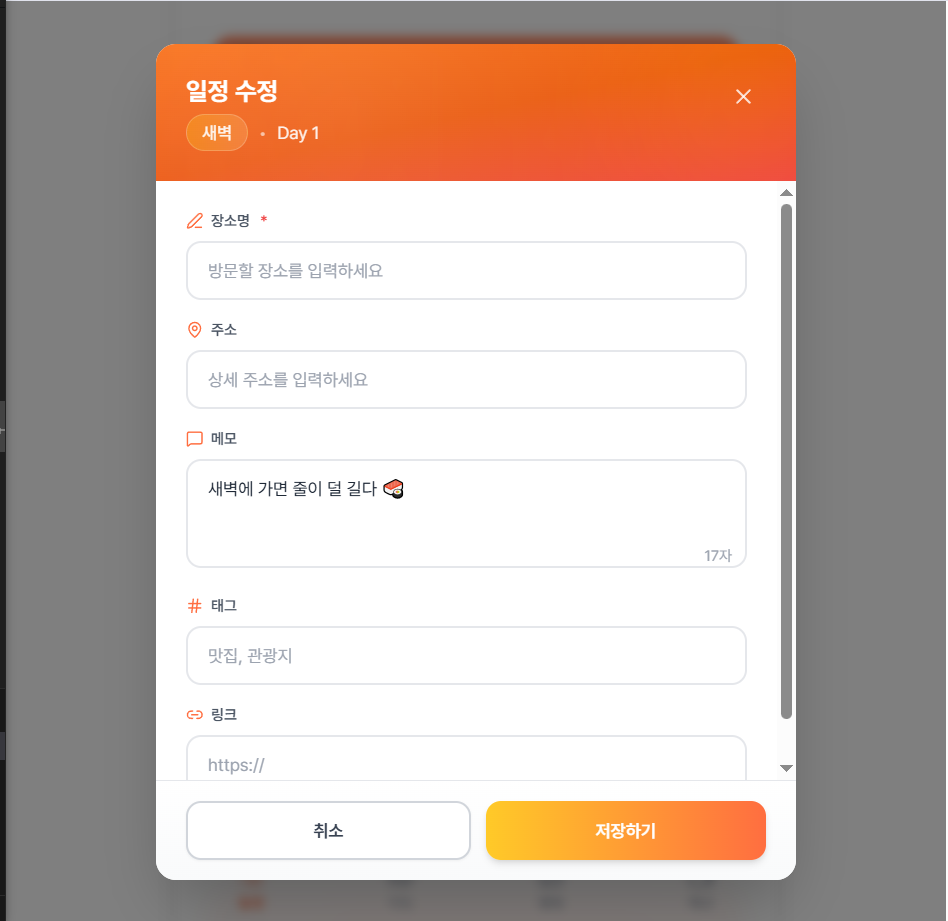
5.
코드
더보기
// ScheduleItemModal.tsx
// 균형잡힌 디자인: 적절한 색상, 절제된 애니메이션, 깔끔한 구조
import { useState, useEffect } from "react";
import { X, MapPin, MessageSquare, Hash, Link2, Edit3 } from "lucide-react";
import { motion, AnimatePresence } from "framer-motion";
import type { ScheduleResponseDto } from "../types/schedule";
import type { PlaceResponseDto } from "@/features/place/types/place";
interface Props {
open: boolean;
onClose: () => void;
onSave: (item: ScheduleResponseDto, placeData?: PlaceResponseDto) => void;
Schedule?: ScheduleResponseDto | null;
place?: PlaceResponseDto | null;
slot: ScheduleResponseDto["timeSlot"];
selectedDay: number;
}
export default function ScheduleItemModal({
open,
onClose,
onSave,
Schedule,
place,
slot,
selectedDay
}: Props) {
const [placeName, setPlaceName] = useState("");
const [address, setAddress] = useState("");
const [memo, setMemo] = useState("");
const [hash, setHash] = useState("");
const [link, setLink] = useState("");
useEffect(() => {
if (open) {
setMemo(Schedule?.memo ?? "");
setPlaceName(place?.name ?? "");
setAddress(place?.address ?? "");
setHash(place?.hash ?? "");
setLink(place?.links?.[0] ?? "");
}
}, [Schedule, place, open]);
if (!open) return null;
const handleSubmit = () => {
const newSchedule: ScheduleResponseDto = {
id: Schedule?.id ?? Date.now(),
day: selectedDay,
timeSlot: slot,
isCompleted: Schedule?.isCompleted ?? false,
sequence: Schedule?.sequence ?? 1,
memo,
};
const newPlace: PlaceResponseDto = {
id: place?.id ?? Date.now(),
name: placeName,
address,
hash,
links: link ? [link] : [],
};
onSave(newSchedule, newPlace);
onClose();
};
const handleBackdropClick = (e: React.MouseEvent) => {
if (e.target === e.currentTarget) {
onClose();
}
};
return (
<AnimatePresence>
{open && (
<motion.div
initial={{ opacity: 0 }}
animate={{ opacity: 1 }}
exit={{ opacity: 0 }}
transition={{ duration: 0.2 }}
className="fixed inset-0 z-50 flex items-center justify-center p-4 bg-black/50 backdrop-blur-sm"
onClick={handleBackdropClick}
>
<motion.div
initial={{ scale: 0.95, opacity: 0, y: 20 }}
animate={{ scale: 1, opacity: 1, y: 0 }}
exit={{ scale: 0.95, opacity: 0, y: 20 }}
transition={{ duration: 0.25 }}
className="bg-white rounded-2xl shadow-2xl w-full max-w-xl overflow-hidden"
>
{/* Header */}
<div className="relative bg-gradient-to-r from-orange-500 to-orange-600 text-white px-6 py-5">
<div className="flex items-center justify-between">
<div>
<h2 className="text-xl font-bold">
{Schedule ? "일정 수정" : "일정 추가"}
</h2>
<div className="flex items-center gap-2 mt-1 text-sm text-white/90">
<span>{slot}</span>
<span>•</span>
<span>Day {selectedDay}</span>
</div>
</div>
<motion.button
whileHover={{ scale: 1.1 }}
whileTap={{ scale: 0.9 }}
onClick={onClose}
className="p-2 hover:bg-white/20 rounded-lg transition-colors"
>
<X className="w-5 h-5" />
</motion.button>
</div>
</div>
{/* Form Content */}
<div className="p-6 space-y-5 max-h-[65vh] overflow-y-auto">
{/* Place Name */}
<div className="space-y-2">
<label className="text-sm font-semibold text-gray-700 flex items-center gap-2">
<Edit3 className="w-4 h-4 text-orange-500" />
장소명
</label>
<input
value={placeName}
onChange={(e) => setPlaceName(e.target.value)}
placeholder="방문할 장소를 입력하세요"
className="w-full bg-gray-50 border border-gray-200 rounded-xl px-4 py-3 text-gray-900 placeholder-gray-400 focus:outline-none focus:border-orange-400 focus:bg-white focus:ring-2 focus:ring-orange-100 transition-all"
/>
</div>
{/* Address */}
<div className="space-y-2">
<label className="text-sm font-semibold text-gray-700 flex items-center gap-2">
<MapPin className="w-4 h-4 text-orange-500" />
주소
</label>
<input
value={address}
onChange={(e) => setAddress(e.target.value)}
placeholder="상세 주소를 입력하세요"
className="w-full bg-gray-50 border border-gray-200 rounded-xl px-4 py-3 text-gray-900 placeholder-gray-400 focus:outline-none focus:border-orange-400 focus:bg-white focus:ring-2 focus:ring-orange-100 transition-all"
/>
</div>
{/* Memo */}
<div className="space-y-2">
<label className="text-sm font-semibold text-gray-700 flex items-center gap-2">
<MessageSquare className="w-4 h-4 text-orange-500" />
메모
</label>
<textarea
value={memo}
onChange={(e) => setMemo(e.target.value)}
placeholder="일정에 대한 메모를 작성하세요"
rows={3}
className="w-full bg-gray-50 border border-gray-200 rounded-xl px-4 py-3 text-gray-900 placeholder-gray-400 resize-none focus:outline-none focus:border-orange-400 focus:bg-white focus:ring-2 focus:ring-orange-100 transition-all"
/>
</div>
{/* Hash Tags & Link */}
<div className="grid grid-cols-2 gap-4">
<div className="space-y-2">
<label className="text-sm font-semibold text-gray-700 flex items-center gap-2">
<Hash className="w-4 h-4 text-orange-500" />
태그
</label>
<input
value={hash}
onChange={(e) => setHash(e.target.value)}
placeholder="맛집, 관광지"
className="w-full bg-gray-50 border border-gray-200 rounded-xl px-4 py-3 text-gray-900 placeholder-gray-400 focus:outline-none focus:border-orange-400 focus:bg-white focus:ring-2 focus:ring-orange-100 transition-all"
/>
</div>
<div className="space-y-2">
<label className="text-sm font-semibold text-gray-700 flex items-center gap-2">
<Link2 className="w-4 h-4 text-orange-500" />
링크
</label>
<input
value={link}
onChange={(e) => setLink(e.target.value)}
placeholder="https://"
className="w-full bg-gray-50 border border-gray-200 rounded-xl px-4 py-3 text-gray-900 placeholder-gray-400 focus:outline-none focus:border-orange-400 focus:bg-white focus:ring-2 focus:ring-orange-100 transition-all"
/>
</div>
</div>
</div>
{/* Footer */}
<div className="px-6 py-4 bg-gray-50 border-t border-gray-200 flex gap-3">
<motion.button
whileHover={{ scale: 1.01 }}
whileTap={{ scale: 0.99 }}
onClick={onClose}
className="flex-1 bg-white border border-gray-300 hover:bg-gray-100 text-gray-700 px-5 py-3 rounded-xl text-sm font-semibold transition-colors"
>
취소
</motion.button>
<motion.button
whileHover={{ scale: 1.01 }}
whileTap={{ scale: 0.99 }}
onClick={handleSubmit}
className="flex-1 bg-orange-500 hover:bg-orange-600 text-white px-5 py-3 rounded-xl text-sm font-semibold transition-colors shadow-sm"
>
저장하기
</motion.button>
</div>
</motion.div>
</motion.div>
)}
</AnimatePresence>
);
}
사진